2024. 3. 5. 22:39ㆍ공부 노트
Spring Boot로 웹 프로젝트를 만들려고 한다
우선 로컬환경을 구성하여야 한다.
1. JAVA 다운로드 - https://www.oracle.com/java/technologies/javase/jdk17-archive-downloads.html
Java Archive Downloads - Java SE 17
WARNING: These older versions of the JDK are provided to help developers debug issues in older systems. They are not updated with the latest security patches and are not recommended for use in production. For production use Oracle recommends downloading th
www.oracle.com
2. Postgresql 다운로드 - https://www.postgresql.org/download/
PostgreSQL: Downloads
www.postgresql.org
3. STS 다운로드 - https://spring.io/tools/
Spring | Tools
spring.io
Spring Tools 4 for Eclipse 다운로드 진행 -> 안에 contents 압축을 풀어 exe 파일을 실행한다.

new project -> Spring Boot -> Spring Starter Project -> 원하는 형상관리와 의존성을 추가한다.
(Gradle, PostgreSQL Driver, Spring Web 등 ...)
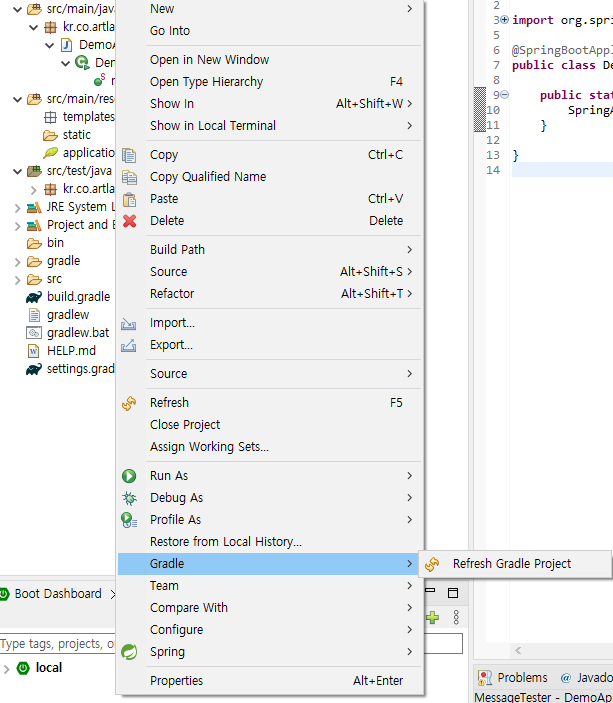
프로젝트 -> 우클릭 Gradle 을 불러온다.
프로젝트 실행 후 console에서 정상적으로 실행되는지 확인한다.

src > main > resource 안에 있는 application 파일을 yaml로 변경하고 postgresql 과 연동한다.
이렇게 하면 웹프로젝트가 실행된다.
기본적인 웹 프로젝트가 생성되었고 이제 웹 프로젝트 개발을 시작하면 된다.
'공부 노트' 카테고리의 다른 글
| 고생할 줄 알고, 고생을 즐길 줄 알아야 한다 (0) | 2024.12.09 |
|---|---|
| 추가적인 노력은 단순한 덧셈이 아닌, 곱셈의 결과를 가져온다 (1) | 2024.12.07 |
| [무한의 부] 마음을 먼저 다스리고 일을 처리한다 (3) | 2024.12.05 |
| postgresql 최대 접속자를 초과하였습니다. (0) | 2024.03.27 |
| Postgresql 압축 파일로 backup <-> restore (0) | 2024.03.26 |